8 Best Ad Spy Tools for 2026: Free and Paid Options Compared
You can see a competitor's ad without knowing whether it made them money. That is the rule I keep in mind whenever I research creative. A public ad can show me the opening line, offer, visual approach, and landing page. It cannot show me the advertiser's margin or customer acquisition cost.
If you already know which brand to check, start with the free library for that ad platform. Pay for another tool when you need to find unfamiliar advertisers, search older material, or keep a useful collection of examples. This guide helps you choose that tool. For the research method itself, read How to Research Competitor Ads Without Copying Them.
BigSpy for discovery across other supported platforms
What a known Google advertiser has published
Google Ads Transparency Center
SpyFu for Google Search ad-copy history
Which unfamiliar advertisers are active in your category
BigSpy
Check a paid plan's network and search limits
How ecommerce ads relate to products and shops
Minea
Check which networks your chosen plan includes
How to save examples and prepare a creative brief
Foreplay
Workflow if you also need Spyder competitor monitoring
How I compared the tools
I looked at five things: the ads each tool can show, the questions its search can answer, whether it preserves useful history, what you can do with a finding afterward, and what the entry plan actually includes. I checked public product pages and documentation. I did not run the same controlled trial in all eight products, so this is a guide to fit and documented capability, not a ranking of measured search accuracy.
An ad that runs for months may be worth studying. Longevity, popularity scores, and estimated impressions still do not prove a profitable campaign.
Ad research and planning tools at a glance
Tool
Main research job
Important limit
Public starting point
Tomako
Turn verified observations into a campaign brief, assets, and follow-up work
Check the original ad in a public library; measure results in your own account
General commercial-ad research focuses on currently running ads
Free
TikTok Creative Center
Study selected TikTok video ads
Top Ads is a selected, advertiser-authorized collection
Free
Google Ads Transparency Center
Check a known Google advertiser
Available records vary by advertiser and format
Free
BigSpy
Discover ads across supported networks
The free daily allowance is for Facebook
Free plan; paid plans vary
AdSpy
Search indexed Meta ads in greater detail
Search depends on its indexed data
$149/month
Minea
Connect ecommerce ads with products and shops
Starter lists Meta ads; verify other network access by tier
$49/month, or $39/month billed quarterly
Foreplay
Save ad examples and write briefs
Spyder monitoring is outside Basic
Basic $59/month
SpyFu
Review Google Search ad-copy history
Competitor traffic and spend figures are estimates
From $33/month; check billing terms
Prices and plan access can change. Use each linked vendor page to check the tier you would actually buy.
Start with Tomako when you have an ad worth testing
Best for: Turning a competitor-ad observation into a campaign decision grounded in your own product. Website:Tomako use cases.
I would not hand a saved ad straight to a copywriter. First I would write down what caught my attention, which customer question it raises, and whether my product can honestly make a related promise. Tomako helps keep that thinking with the work that follows.
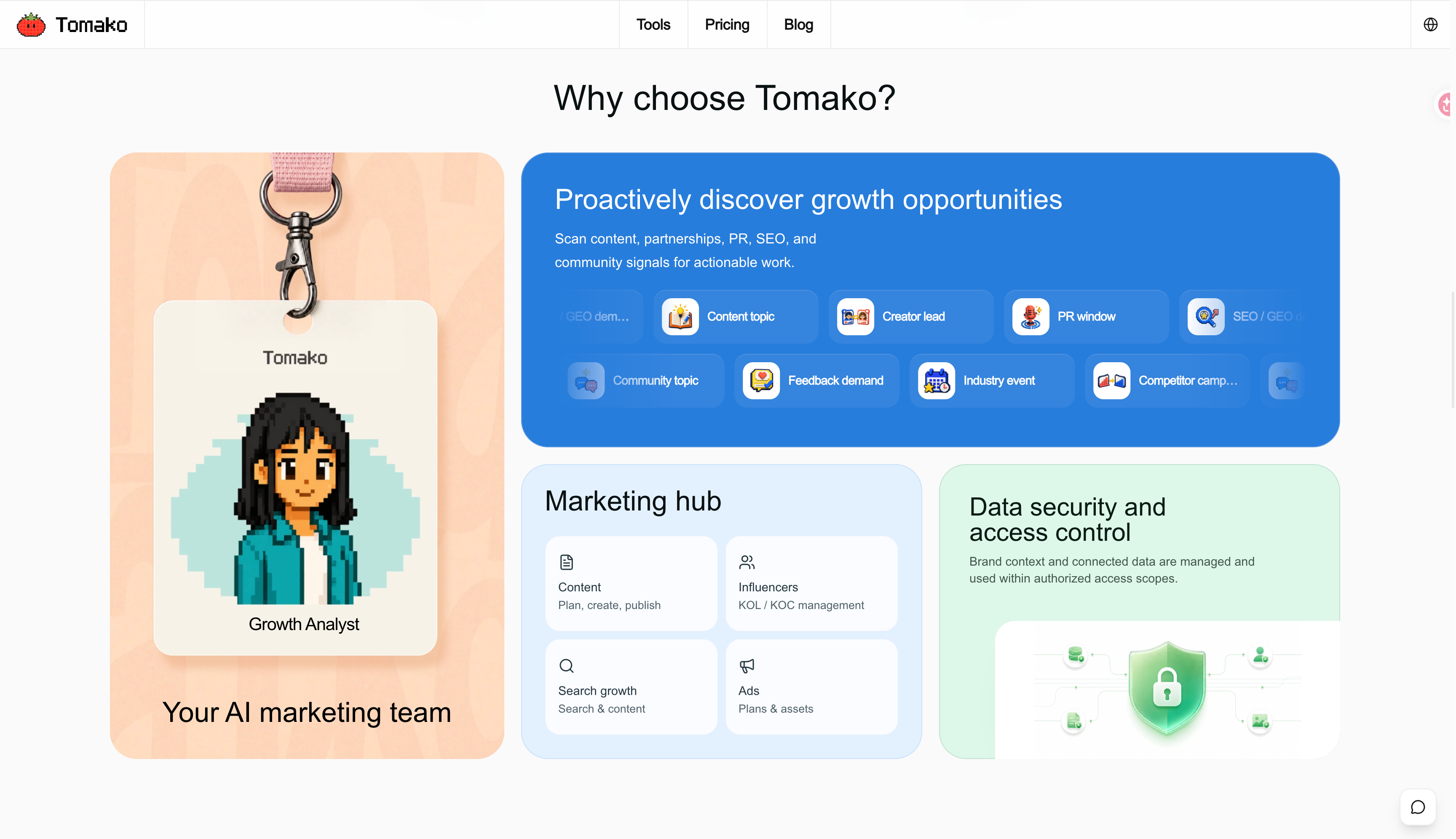
In Tomako, your product details, audience, positioning, brand voice, and assets can stay connected across projects. Its public product overview also describes an Agent that surfaces growth opportunities, including competitor-campaign signals; an Ads area for plans and assets; and project work that can become ToDos, content, visuals, and a reviewable history. That is useful when you have several promising examples but need to decide which message to test and what to make next.
Suppose a rival's ad leads with delivery speed. I would save the source link, check the customer concern behind it, add my own confirmed delivery terms, and ask Tomako to help shape a brief with a testable angle, draft assets, and follow-up actions. I would inspect the original ad in its public library and judge my test with my own campaign data.
Tomako's public product overview shows its opportunity and marketing-work areas. This is a website screenshot, not an ad-library search result.
Best for: Looking at a brand's visible Facebook and Instagram ads. Website:Meta Ad Library. Price: Free.
I start here when I have a named competitor. Search the advertiser and market, then note which customer problem each ad opens with, what it offers, and where its link goes. This gives you the creative in its platform context. It does not give you that advertiser's sales results. General searches are most useful for current commercial ads; other categories follow different transparency rules.
Use it when you have a short list of brands to check. Move on when you need older examples or more specialized filtering.
2. TikTok Creative Center: Study the first seconds of a video
Best for: Seeing how selected TikTok ads use hooks, demonstrations, and pacing. Website:TikTok Creative Center. Price: Free.
Watch a promising ad once as a viewer, then again with a question in mind: what did you learn in the first three seconds? Filters such as region and industry help narrow the examples. TikTok says its Top Ads are selected ads authorized by advertisers, so treat the collection as inspiration rather than a complete archive of every campaign.
Use it when video structure is the question. Move on when you need wider discovery or a shared research library.
3. Google Ads Transparency Center: Verify a known advertiser
Best for: Checking the public Google ads associated with an advertiser you know. Website:Google Ads Transparency Center. Price: Free.
This is a useful first check before buying a search-ad intelligence subscription. Compare the offer, wording, and creative formats you can see. Do not infer the advertiser's keyword bids, full budget, or return from a public creative. If the question is how search copy changed for a keyword, SpyFu is the more relevant tool here.
Use it when you want to inspect a named advertiser. Move on when you need keyword-based ad-copy history.
4. BigSpy: Discover advertisers beyond your shortlist
Best for: Finding examples across several supported platforms. Website:BigSpy. Price: Free plan; paid access varies.
BigSpy is most useful when you know the category but not all the advertisers worth watching. Start with a narrow product or audience term and record why each result matters. Its free-plan FAQ specifies five queries and 20 ad saves per day on Facebook. Searching, filtering, sorting, and paging can each count as a query; the allowance is not a promise of free access to every network.
Use it when discovery takes longer than reviewing. Move on when you only need a few known brands on one platform.
5. AdSpy: Search Meta ads in greater detail
Best for: Research that depends on more detailed searches across indexed Facebook and Instagram ads. Website:AdSpy. Price: Its public page advertises $149/month.
AdSpy describes searches involving ad comments and landing-page information. That can help you follow a question from the creative to the discussion around it or the page it promotes. If a comment reveals a recurring objection, write it down as a question for your own customer research. It is not proof that a particular reply will raise conversion.
Use it when Meta is a major channel and the free library's search depth holds you back. Move on when you chiefly study TikTok videos or Google Search ads.
6. Minea: Put ecommerce ads beside product research
Best for: Researching an ad together with the product and shop behind it. Website:Minea. Price:Starter is listed at $49/month, or $39/month when billed quarterly.
For an ecommerce marketer, the product context can matter as much as the image. Compare how sellers frame similar goods, what their shops promise, and whether the destination supports the ad's claim. Check the tier before purchasing: Minea's Starter listing names Meta ads, so the lower price should not be read as access to every network mentioned on the site.
Use it when product and shop research are part of your creative decision. Move on when you have no need for ecommerce context.
7. Foreplay: Keep useful examples close to the brief
Best for: Saving ads, reviewing them together, and turning observations into a creative brief. Website:Foreplay. Price:Basic is listed at $59/month.
I would use Foreplay when the team keeps rediscovering an ad because nobody recorded why it was useful. Save the example with a short note about its audience, hook, offer, and visual structure. Basic covers research and organization. The current plan comparison places Spyder competitor monitoring in higher plans, so compare Workflow if automated monitoring is the reason you are buying.
Use it when the handoff from research to production is messy. Move on when you only need an occasional free advertiser check.
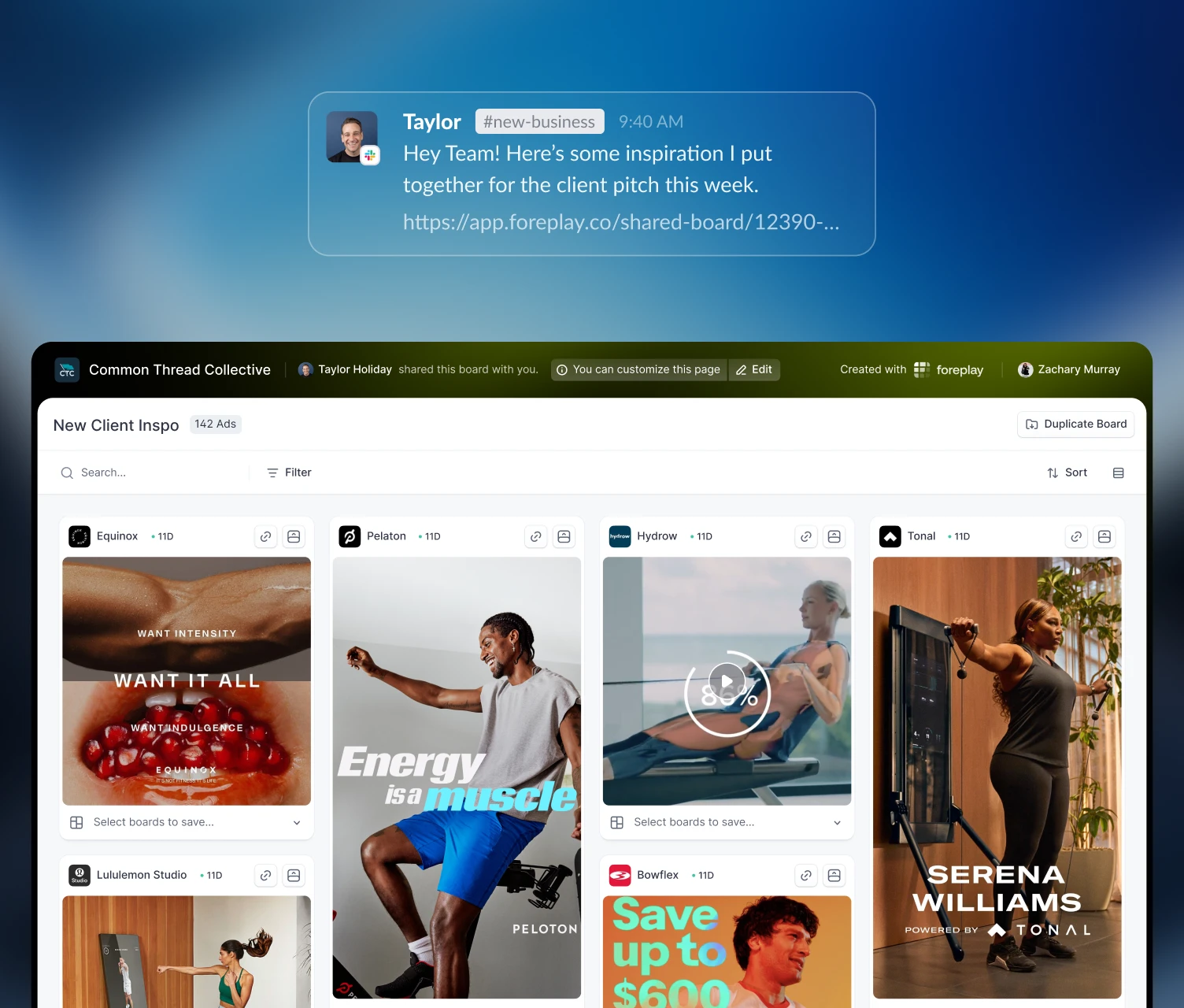
Foreplay's official site shows a complete shared board for organizing saved ad examples. The screenshot does not indicate how those ads performed.
8. SpyFu: Review Google Search ad-copy history
Best for: Seeing how advertisers have changed copy around a search keyword. Website:SpyFu ad history. Price: The official page says membership starts at $33/month; confirm the billing terms.
Search history can show when a claim appeared, disappeared, or returned. It gives you a better question to test in your own ads; it does not reveal why the competitor changed course. SpyFu's competitive traffic and spend numbers are estimates, not access to the advertiser's account.
Use it when Google Search copy is central to your work. Move on when you need video creative or a visual swipe file.
Turn one finding into a test
Suppose several competitors open with the complaint, “Status meetings take too much time.” I would not paste that line into our next ad. I would first check whether our customers describe the problem that way.
Record the source link and date, the exact claim, the offer, and the destination page. Then separate two sentences: “Three advertisers mention the cost of status meetings” is an observation; “Our buyers may respond to a message about finding answers without another meeting” is a hypothesis. Check the second sentence against customer conversations or support notes. If it holds up, test one message change with an agreed audience and success measure.
When the campaign has results, calculate ROAS using consistent revenue and spend definitions. The competitor's public ad cannot provide that number for you.
Frequently asked questions
What is the best free ad spy tool?
Start with the native library for your channel: Meta Ad Library for a known Facebook or Instagram advertiser, TikTok Creative Center for selected TikTok ads, and Google Ads Transparency Center for a known Google advertiser. BigSpy has a limited Facebook free plan.
Can an ad spy tool show which competitor ads are profitable?
No. You cannot see the advertiser's complete spend, conversions, margins, or customer value from a public ad. Long-running creative and estimated popularity can suggest what to investigate, not prove profit.
Which tool is best for Facebook and Instagram ads?
Start with Meta Ad Library for free checks of known advertisers. Compare AdSpy if you need deeper searches of indexed Meta ads, or BigSpy if your work also covers other supported platforms.
Which tool should I use for Google Search ads?
Start with Google Ads Transparency Center to inspect a known advertiser's visible creatives. Compare SpyFu when your main question is how Google Search ad copy changed around a keyword.
Does Foreplay Basic include Spyder monitoring?
No. Foreplay's plan comparison places Spyder competitor monitoring in higher plans. Basic starts at $59/month and focuses on finding, saving, organizing, and briefing ad ideas.
Can AI help with competitor-ad research?
AI can group recurring claims, summarize your notes, and propose test ideas. It cannot establish why a competitor ran an ad or whether the ad made money. Keep the original link and separate what you saw from what you inferred.
If you can name the missing capability, choosing becomes easier. Check known advertisers for free first. Pay when you need deeper history, cross-platform discovery, ecommerce context, or a dependable path from examples to a brief.
Ricky works across influencer marketing, SEO/GEO, and AI-enabled growth workflows, with experience in prompt engineering and development. Her focus goes beyond visibility: connecting research, content production, search presence, and execution into a workflow a team can actually use. On the Tomako Blog, she writes about reusable research methods, content and search strategy, and how AI can help teams move concrete growth work forward.
 Ricky
Ricky


 SEO/GEO
 Learning loop