Start with the conversion problem you actually have
If you are choosing a CRO tool, I would ask what stopped your last improvement idea from moving forward. Maybe you do not yet know where visitors leave. Maybe you have watched the recordings but still cannot name one change worth testing. Those problems call for different tools.
I have compared these nine by the work each one helps you do. Start with Google Analytics 4 if you lack a conversion baseline. Use Microsoft Clarity or Contentsquare when you need to inspect what happened on the page. If you have a documented customer concern but need a test brief and copy options, consider Tomako. For website experiments, compare Convert Experiences and Wingify/VWO. PostHog is a stronger fit for in-product activation, Unbounce for campaign landing pages, and Optimizely for a program shared across teams.
Build $99/month; Experiment $149/month on monthly billing
Optimizely
Several teams run an experimentation program
Custom quote
Pricing and plan limits can change. Check the vendor's current terms before buying.
How I would use the tools together
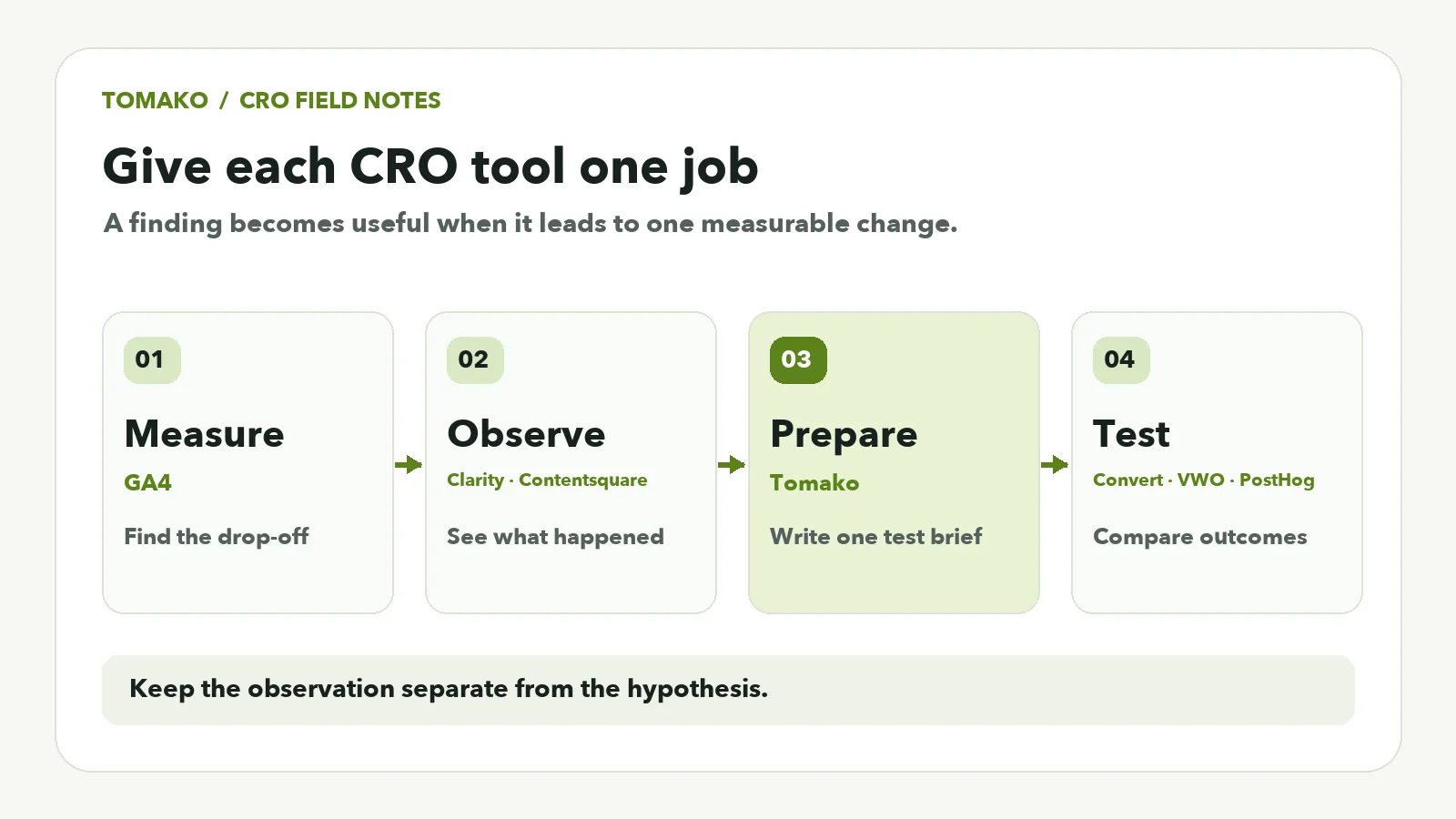
Take a product page with unclear delivery information. If the data shows a mobile purchase gap, I would inspect the relevant sessions before drafting a fix. Several shoppers opening the delivery details is an observation, not proof that the shipping policy caused the gap. I would give that observation and the approved policy to the content owner, then ask for one testable change. Tomako can help prepare the brief and copy options. A person checks the facts; a testing platform measures what happens next. Each tool has a job, and one recording never has to carry more certainty than it deserves.
Explanatory illustration: each stage answers a different question.
The nine tools
1. Tomako: Prepare a test from a real customer problem
Best for: You know where customers struggle but have not decided what to change. Website:https://tomako.ai/
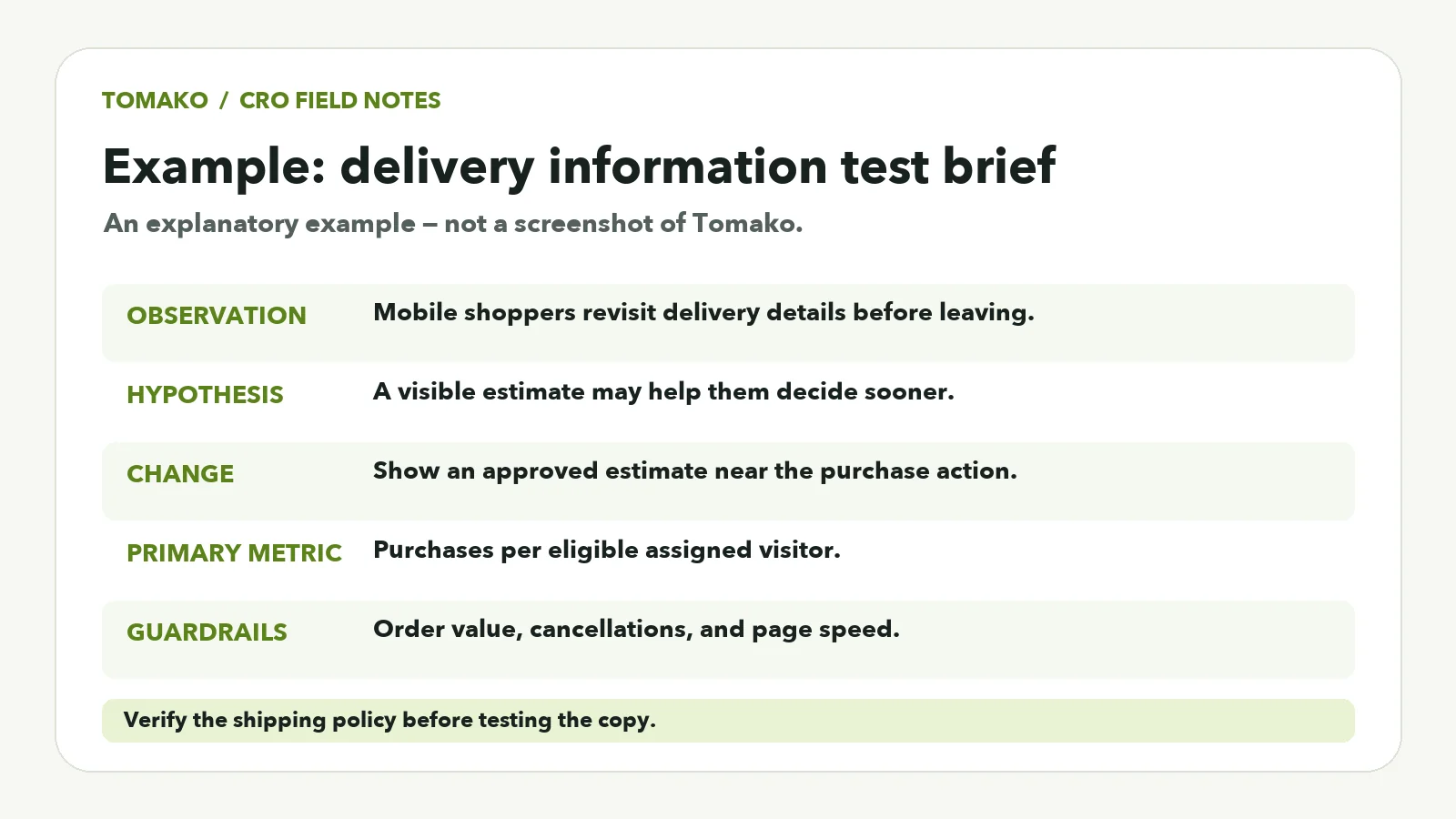
Say a mobile shopper opens delivery information three times before leaving a product page. Give Tomako that observation, the actual shipping policy, the audience, and the space available near the purchase button. Ask for three short ways to show the delivery estimate and a brief explaining what each option is meant to clarify. A reviewer can check the copy against the policy before choosing a variant.
Illustrative example based on the delivery-information scenario, not a Tomako interface screenshot.
Capabilities: AI-assisted drafting within Tomako's marketing workflow. Pricing and access: See current plans and check which Agents and specialist tools are available to your account. Pros: Turns an observation into a concrete task; gives reviewers options tied to the facts supplied. Cons: You still need reliable analytics and an experimentation platform to measure the approved change. Choose it if: The handoff from research to marketing production is slowing down your next test.
2. Google Analytics 4: Measure the conversion path
Define a business outcome first: a paid order, qualified enquiry, or activated account. Then compare the steps leading to it across devices or audiences. A mobile checkout gap tells you where to investigate; it does not tell you why people left.
Capabilities: Event and funnel analysis. Pricing and access: The standard product is free; Analytics 360 is separate. Pros: A shared measurement foundation. Cons: Events need careful setup, and there are no heatmaps or recordings. Choose it if: You cannot yet say where conversion loss occurs.
3. Microsoft Clarity: Watch where visitors get stuck
Filter recordings by the affected page and device. Look for repeated clicks, unexpected scrolling, or a control visitors cannot use. Review masking before sharing a recording with colleagues.
Capabilities: Heatmaps and session recordings. Pricing and access: Free. Pros: Visual context that a funnel chart cannot provide. Cons: A recording is one observed visit, not proof that a proposed change will lift conversions. Choose it if: You know where visitors leave and need to see what they encountered.
4. Contentsquare: Pair behavior with feedback
Best for: Teams that want to ask visitors about friction as well as observe it. Website:https://contentsquare.com/
Choose one funnel segment and one question. If customers stall at shipping details, inspect relevant sessions and ask what information was missing. Check replay capture separately from total tracked sessions: the two allowances differ.
Capabilities: Experience analytics, replays, heatmaps, funnels, and feedback tools. Pricing and access: The free plan advertises up to 200,000 monthly sessions and 100 monthly feedback/survey responses; new accounts can try Growth for 15 days. Pros: Combines behavior and direct responses. Cons: A narrow segment may yield fewer watchable replays than the session headline suggests. Choose it if: Knowing why people hesitate matters as much as counting exits.
5. Convert Experiences: Run dedicated website tests
Best for: Teams with a repeatable website experimentation process. Website:https://www.convert.com/
Estimate how many visitors will actually enter your test, not just how many visit the site. Assign an owner to variant setup, event checks, and result review before the test goes live.
Capabilities: Website experiments, targeting, goals, and reporting. Pricing and access: Growth lists $399/month on monthly billing for 100,000 tested users per month, or $3,588/year for 1.2 million tested users annually; a standard 15-day trial is offered. Pros: A specialist testing workflow with published starting capacity. Cons: Implementation and quality checks remain your responsibility. Choose it if: You are ready to run controlled website experiments regularly.
6. Wingify/VWO: Configure a broader testing setup
Best for: Teams evaluating several research and experimentation needs together. Website:https://wingify.com/
Tell sales which surface you need to change, how much traffic is eligible, and whether you also need behavioral analysis. Ask for modules and implementation services as separate line items in the quote.
Capabilities: Depend on the selected products and configuration. Pricing and access: Custom quote; confirm trial access for the proposed setup. Pros: Scope can be matched to several related needs. Cons: Modules, billing units, and implementation effort take time to compare. Choose it if: A single-purpose tool leaves important parts of your program uncovered.
7. PostHog: Test product activation
Best for: Product and engineering teams improving the path from signup to first value. Website:https://posthog.com/
Define activation before changing onboarding. Creating a useful project may matter more than checking every item in a welcome flow. Track exposure as well as the outcome.
Capabilities: Product analytics, replay, feature flags, and experiments. Pricing and access: Monthly free allowances include 1 million analytics events, 5,000 recordings, and 1 million feature-flag requests. Pros: Connects product behavior to feature tests. Cons: Identity, events, flags, and their different usage units need technical ownership. Choose it if: The change lives inside a product experience.
8. Unbounce: Build and test campaign pages
Best for: Marketers responsible for paid-campaign landing pages. Website:https://unbounce.com/
Compare the offer on the page with the promise in the ad. A shorter form might raise submissions but lower lead quality, so measure what happens after a lead reaches your CRM.
Capabilities: Landing-page creation and A/B testing on the Experiment plan. Pricing and access: Build is $99/month and Experiment is $149/month on monthly billing; a 14-day trial is available. Pros: Marketing can make and test page changes within a dedicated workflow. Cons: Traffic and domain limits matter, and form completions alone can mislead. Choose it if: The change belongs on a campaign page.
9. Optimizely: Coordinate a multi-team program
Best for: Organizations that run many experiments across customer experiences. Website:https://www.optimizely.com/
Ask for a demonstration of one realistic experiment from setup through assignment, measurement, and review. Decide who can launch tests and how overlapping experiments will be handled.
Capabilities: Web and server-side experimentation within the selected configuration. Pricing and access: Individually packaged; request a quote and demonstration. Pros: Broad scope for an ongoing program. Cons: More configuration and cross-team ownership than a small testing project needs. Choose it if: Experimentation is a recurring practice shared by several teams.
If this were my project, here is where I would start
For an ecommerce checkout, I would find the largest drop-off and watch sessions from that step. If shoppers keep looking for delivery details, I would check the policy, prepare a short line near the purchase button, and test that single change. I would count purchases among eligible visitors and watch cancellations and order value too. A lift in button clicks alone can be an expensive false positive.
For SaaS, I would define the first action that actually delivers value: is it creating a usable project or inviting a colleague? For a B2B form, I would follow leads through qualification instead of stopping at submissions. On a campaign page, I would first check whether the ad makes a promise the page keeps. The next tool depends on which of these questions you are trying to answer.
I would give every shortlisted product the same task
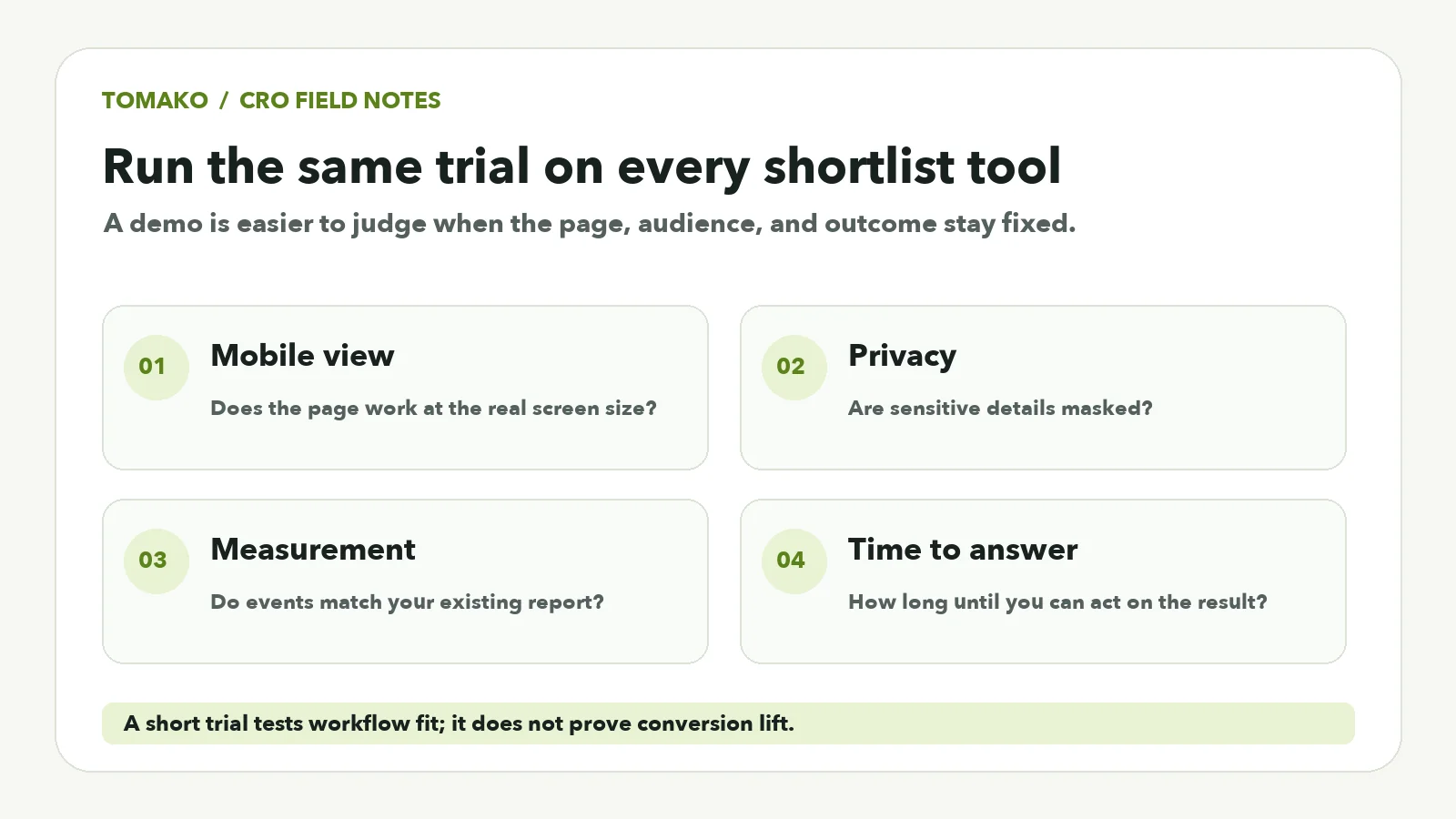
I would not choose from a sales demo alone. Give each product the same page, audience, and outcome, then time how long you need to get an answer you can use. Does the mobile version work? Are sensitive details masked? Do the events match the existing report? These details decide whether a tool will survive ordinary weekly work.
With Tomako, I would supply one real finding and clear product constraints, then check each line of the draft against the source material. Copy that reads well still needs a human review and a real test. A short trial can expose workflow problems; it cannot establish a conversion lift by itself.
Explanatory checklist: give each shortlisted tool the same task.
Make the next test concrete
Brief field
Example
Observation
Mobile visitors repeatedly look for delivery details before leaving
Hypothesis
A visible delivery estimate may help them decide sooner
Proposed change
Place a concise estimate near the purchase action
Primary metric
Completed purchases per assigned eligible visitor
Guardrails
Order value, cancellations, and page performance
Review
Confirm shipping terms, mobile layout, exposure, and tracking
Choose the metric and decision process before launch. Keep the observation separate from the hypothesis: people looking for shipping details does not prove shipping caused their exit.
Turn a CRO finding into your next marketing brief
Give Tomako the customer problem, approved product facts, and target audience. Review the proposed brief and copy options, then choose a change worth testing.
What are the best free conversion rate optimization tools?
Google Analytics 4 and Microsoft Clarity are a useful starting pair for funnel measurement and behavioral research. Contentsquare and PostHog have free allowances too. Check the limits against your traffic and the work you need to do.
What is the difference between a CRO tool and an A/B testing tool?
CRO tools help with measurement, research, test preparation, page creation, or experiments. An A/B testing platform assigns eligible visitors to variants and compares the outcomes.
Which CRO tools suit ecommerce?
Use analytics to find purchase drop-off and behavioral research to inspect the affected journey. Prepare a specific page change, then choose a platform that can test it on the storefront surface you control.
How much traffic do I need for an A/B test?
There is no fixed minimum. The sample you need depends on your baseline conversion rate, the size of the change you hope to detect, and the analysis method. Estimate eligible traffic before launching.
How can Tomako help prepare a CRO test?
Give Tomako the observed customer problem, approved product facts, and conversion goal. Review the resulting brief and draft variants, then run the approved change with the testing platform you choose.
Can AI improve conversion rates?
AI can help organize evidence and draft changes worth evaluating. Check its output against the source facts, then measure what customers actually do. A plausible draft is a starting point for a test, not a result.
My recommendation
Write down the next test you want to run but have not managed to launch. If you cannot say where customers leave, fix measurement first. If you have seen the hesitation but cannot agree on a change, use Tomako to turn the finding into a brief you can review. Once the change and success measure are clear, choose a testing tool for the surface you own. That order puts the budget against the part of the work that is actually stuck.
Ricky works across influencer marketing, SEO/GEO, and AI-enabled growth workflows, with experience in prompt engineering and development. Her focus goes beyond visibility: connecting research, content production, search presence, and execution into a workflow a team can actually use. On the Tomako Blog, she writes about reusable research methods, content and search strategy, and how AI can help teams move concrete growth work forward.
 Ricky
Ricky